
Download Call an AI – AI Voice Generator, Free Phone Bot Tool
Overview
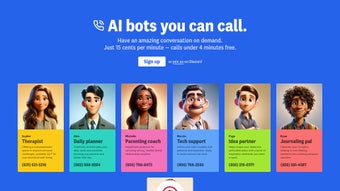
Call an AI is a cutting‑edge, web‑based AI voice generator that lets you pick up the phone and talk to a range of intelligent bots anytime, anywhere. Whether you need a therapist who listens without judgment, a daily planner that reminds you of meetings, a parenting coach that offers practical tips, a tech‑support specialist that troubleshoots your gadgets, an idea partner for brainstorming, or a quiet journaling companion, Call an AI has a dedicated bot ready to answer your call 24/7. The platform’s standout capability is full customization: users can design their own AI persona, assign it a unique phone number, and tailor its knowledge base to fit personal or business needs.
After each call, you receive a transcript and an audio recording, turning every conversation into a searchable knowledge asset. Future updates promise memory‑enabled dialogues, adaptive learning that refines responses over time, scheduled calls, and even voice‑style personalization. Built with security and privacy in mind, Call an AI stores data on encrypted servers and offers granular control over what is saved.
The service is free to start, with optional premium upgrades for higher call volume, advanced analytics, and priority support. By merging a simple telephone interface with sophisticated natural‑language processing, Call an AI turns a regular phone line into a powerful productivity and wellbeing tool.
Key Features of Call an AI
- On‑Demand Phone Conversations – Dial a dedicated number and instantly connect with an AI bot without installing any app.
- Multiple Bot Personas – Choose from therapist, planner, parenting coach, tech support, idea partner, journaling companion, and more.
- 24/7 Availability – All bots are online around the clock, guaranteeing help whenever you need it.
- Custom Bot Creation – Build a personal AI assistant, assign a unique phone number, and train it with your own data.
- Transcripts & Audio Records – Automatic generation of text transcripts and downloadable audio files after each call.
- Secure Cloud Storage – End‑to‑end encryption for all conversation data, with user‑controlled retention policies.
- Cross‑Platform Access – Works on any device that can make a phone call: smartphones (iOS, Android), landlines, and VoIP services.
- Future‑Ready Roadmap – Upcoming features include conversation memory, adaptive learning, call scheduling, and voice‑style customization.
- Free Tier & Premium Plans – Start for free with limited minutes; upgrade for higher limits, analytics, and priority support.
- Easy Integration – API hooks allow businesses to embed the phone‑bot experience into existing workflows.
Installation, Compatibility & How to Use Call an AI
Because Call an AI is a cloud‑based service, there is no traditional software download or installation required on your computer. The only prerequisite is a device capable of placing a telephone call—whether it’s a smartphone, a desktop with a VoIP client, or a classic landline. Follow these simple steps to get started:
- Sign Up – Visit the official website, create a free account using your email, and verify the address.
- Select a Bot – After logging in, browse the bot marketplace. Click “Add to My Bots” on the persona that matches your current need.
- Get a Phone Number – For each bot, the platform automatically provisions a unique toll‑free or local number. You can also request a custom vanity number for premium users.
- Configure Preferences – Set language, voice tone (male/female), and any specific prompts you want the bot to recognize. For custom bots, upload a CSV or JSON file with domain‑specific knowledge.
- Make the Call – Dial the assigned number from any phone. The AI greets you, confirms the bot’s role, and begins the conversation.
- Review the Output – After the call ends, log back into the dashboard. Your transcript appears under “Recent Calls,” and a high‑quality audio file is available for download.
- Iterate & Upgrade – If you need more minutes or advanced analytics, navigate to the “Plans” page and select a premium tier. Your account upgrades instantly.
Compatibility – Call an AI works across all major operating systems because it only requires a phone line. It is fully compatible with iOS 14 and later, Android 9 and later, Windows 10 (and newer) desktop VoIP clients (such as Microsoft Teams, Zoom Phone, or any SIP softphone), and macOS 11 Catalina and newer. No additional drivers or plugins are needed.
For users who prefer a visual interface, the web dashboard is responsive and works in Chrome, Firefox, Safari, and Edge. The platform also offers a lightweight mobile web app that can be bookmarked for one‑tap access to your bot list, call history, and settings.
Pros, Cons, Frequently Asked Questions & Final Verdict
Pros
- Instant phone‑based AI interaction – no app download needed.
- 24/7 availability of multiple specialized bots.
- Custom bot creation with unique phone numbers.
- Automatic transcripts and audio recordings for easy reference.
- Secure, encrypted storage with user‑controlled data retention.
- Free tier for casual users and scalable premium plans.
- Cross‑platform compatibility (iOS, Android, Windows, macOS, landline).
- Future‑proof roadmap with memory and adaptive learning.
Cons
- Reliance on a phone connection may incur carrier charges for international calls.
- Free tier limits monthly call minutes, which may be restrictive for heavy users.
- Current voice customization is limited to preset male/female tones.
- Advanced analytics are only available on higher‑priced plans.
- No native desktop application – all interactions happen via phone.
Frequently Asked Questions
Is Call an AI really free to use?
Yes, the platform offers a free tier that includes a set number of call minutes each month, access to all standard bots, and basic transcript storage. Premium plans are optional and provide additional minutes, advanced analytics, and priority support.
Can I use Call an AI on my landline?
Absolutely. Since the service works through regular telephone numbers, any landline can dial the bot’s assigned number and start a conversation just like a mobile phone.
How secure is my conversation data?
All transcripts and audio files are stored on encrypted servers that meet industry‑standard security protocols. Users can delete recordings at any time, and data is never shared with third parties without explicit consent.
What happens if I exceed my free minute allowance?
When you reach the free limit, calls will be automatically blocked until the next billing cycle or until you upgrade to a paid plan. Upgrading is instant, and you can add extra minutes on‑demand.
Can I integrate Call an AI with my existing CRM?
Yes, the platform provides API endpoints that allow developers to push call logs, transcripts, and sentiment data into popular CRMs such as Salesforce, HubSpot, or Zoho. This feature is available on premium tiers.
Conclusion & Call to Action
Call an AI bridges the gap between conversational AI and the familiar telephone experience, delivering a secure, flexible, and instantly accessible tool for personal productivity and wellbeing. Its diverse bot library, custom‑bot creation, and built‑in transcript archive make it a standout choice for anyone who prefers voice interaction over text‑based chat. While the free tier’s minute cap and limited voice‑style options may prompt power users to upgrade, the overall value—especially for professionals, parents, and anyone seeking on‑demand support—is exceptional. Ready to try a virtual therapist, a 24/7 tech assistant, or build your own AI companion? Visit the official website, create your free account, and start dialing today.



.png)



